
I have to confess — the first time I saw a server chassis wide open, I was completely overwhelmed. What is what? Why are there so many cables? Where does the data actually go? And even today, as someone who spent years as a computational physicist thinking in abstractions and equations, the physical guts of a server can still feel like a different universe.
But here's the thing: it turns out it's not that complicated once you know what to look for. The jargon is dense, but the logic underneath is surprisingly clean.
So I want to share what I've learned navigating this world — how modern CPUs talk to everything around them, and why the choices we make about that conversation shape the performance, cost, and architecture of every server we build. I'll do this across two articles. This first one focuses on internal storage: the drives that live physically inside the server chassis — how data moves between the CPU and those drives, what hardware sits in between, and why some configurations cost far more than others.
The Lane Budget: 128 Doors, Too Many Guests
Every modern server CPU — whether it's an AMD EPYC or an Intel Xeon — comes with a fixed number of PCIe lanes. Think of them as physical doorways out of the processor. Each device that wants to communicate with the CPU needs one or more of these doorways, and a typical high-end CPU provides around 128 lanes.
That sounds generous until you start doing the math. A single 2.5-inch NVMe SSD needs 4 lanes (x4) to run at full speed. Want to fill the front of a 2U server with 24 NVMe drives? That's 96 lanes — 75% of the CPU's entire I/O budget — just for storage. What's left for your network cards, GPUs, or accelerators? Not much.
This is the fundamental tension in server design: every lane you spend on storage is a lane you can't spend elsewhere. The art of server architecture is really the art of budgeting these lanes for the workload at hand.
To make this concrete, here's the full I/O block diagram of a real single-socket server — the Lenovo ThinkSystem SR635 V3. Every line leaving the CPU is a PCIe lane allocation, and you can see exactly how the budget is carved up between NVMe storage, SATA, risers, OCP slots, and boot drives:
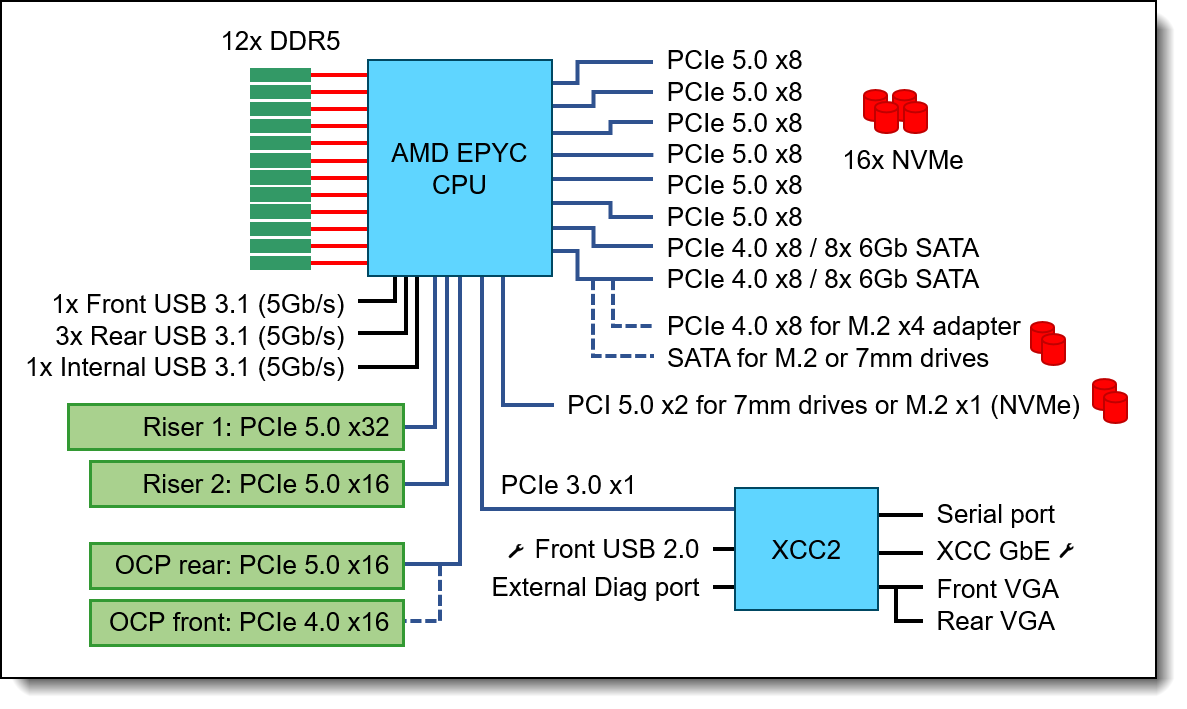 Figure 1: Full PCIe lane allocation for a single-socket server. Source: Lenovo Press (2025).
Two Paths to Talk: Direct-Attach vs. Controller
How storage connects to those lanes comes down to one question: does the drive speak the CPU's language natively, or does it need a translator?
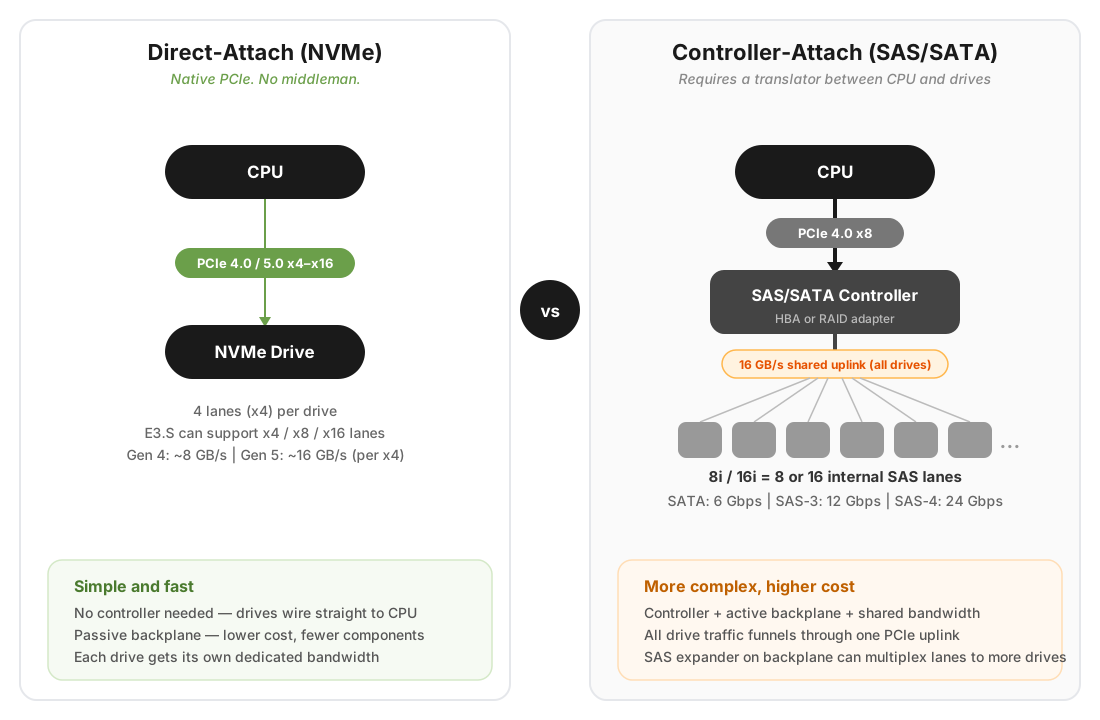 Figure 2: The two paths from CPU to storage.
Direct-attach (NVMe) is the straightforward path. NVMe drives speak PCIe natively — the lanes run directly from the CPU to the drive with no middleman. This is what gives NVMe its remarkably low latency and high bandwidth. For the standard 2.5-inch form factors (U.2 and U.3), each drive uses a x4 link — four lanes, one drive, done. Newer form factors change this equation: E3.S drives can negotiate x4, x8, or even x16 links depending on the slot, while M.2 boot drives often run at x2 or even x1 to conserve lanes.
Controller-attach (SAS/SATA) is the legacy path. These drives can't speak PCIe, so they need a storage controller — a RAID card or HBA (Host Bus Adapter) — sitting between them and the CPU. This applies to both SAS and SATA drives:
| Interface | Raw Bandwidth | Effective Throughput | Notes |
|---|---|---|---|
| SATA III | 6 Gbps | ~600 MB/s | Dead-end interface since 2009; cheapest but slowest. |
| SAS-3 | 12 Gbps | ~1.2 GB/s | Dual-ported for redundancy; standard for enterprise HDD/SSD. |
| SAS-4 | 22.5 Gbps | ~2.4 GB/s | Latest generation; doubles SAS-3 throughput (T10, 2017). |
SAS controllers are backward-compatible with SATA drives — you can plug a SATA drive into a SAS backplane and it works at 6 Gbps. The reverse is not true.
Managing the Middleman: HBA, RAID, and the Tri-Mode Bridge
How this controller manages data defines the system's architecture. An HBA (Host Bus Adapter) operates in "passthrough" or "IT mode," presenting each drive individually to the OS. A RAID controller runs its own firmware to manage hardware RAID levels with a dedicated, often flash-backed cache, offloading parity computation from the CPU at the expense of added cost and complexity. In many modern ecosystems like Lenovo ThinkSystem, these choices are simplified into standard tiers: pure HBAs for software-defined storage (like the 4350 series), basic RAID for boot protection (the 5350 series), and high-performance Tri-Mode controllers (the 940/960 series).
The Tri-Mode controller is the modern bridge. Rather than forcing a choice between NVMe and SAS/SATA at the chassis level, it auto-detects what kind of drive is in each slot. Plug in an NVMe drive, and the signal passes through as native PCIe; plug in a SAS or SATA drive, and the controller engages its translation logic. It offers maximum flexibility, but you still pay the "controller tax" — the silicon cost and the fixed PCIe lane allocation to the CPU — even when running pure NVMe.
This controller-to-CPU link is where the bandwidth math gets interesting. A PCIe x8 Gen 4 link provides roughly 16 GB/s of total upstream bandwidth. While a controller might manage 8, 16, or even 24+ drives (using a SAS Expander chip on the backplane to multiplex signals), all that traffic must eventually funnel through that single PCIe link to the CPU. The controller's onboard processor manages this bottleneck, queueing, and protocol translation — it's a genuinely complex piece of silicon.
Signal Integrity: Backplanes, Retimers, and the Physics of Distance
Between the CPU at the center of the motherboard and the drives at the front of the chassis, there's more going on than copper traces.
The backplane sits just behind the front drive bays. It's a dense PCB that does two critical jobs. First, it distributes power — taking bulk voltage from the power supplies and stepping it down to the exact levels each drive requires. Second, for SAS configurations, it often houses a SAS Expander chip, which lets a controller with only 8 physical connections multiplex signals across 24 drives.
But the bigger engineering challenge is signal integrity. With PCIe Gen 4 and especially Gen 5, servers hit a wall of physics. High-frequency electrical signals degrade rapidly over distance — a phenomenon called insertion loss. The standard FR4 fiberglass in motherboards literally absorbs these signals. If an NVMe drive sits at the front of the server and the CPU is 15 inches away at the back, a raw Gen 5 signal will degrade into noise before it arrives.
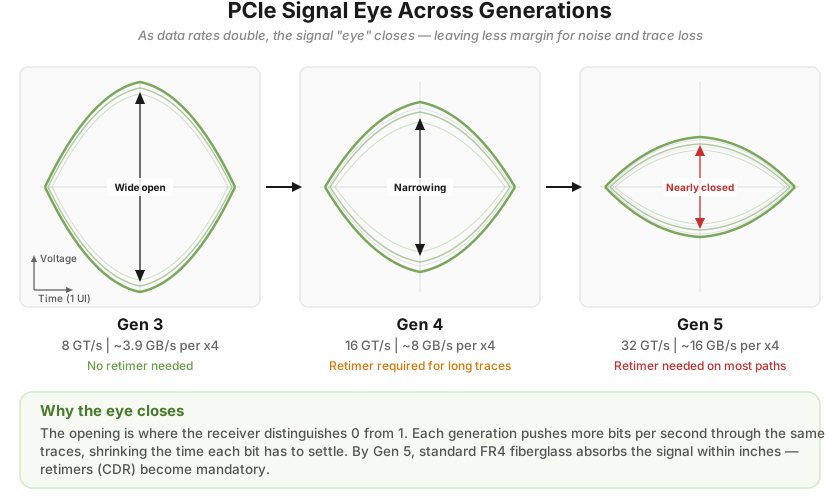 Figure 3: The signal "eye" across PCIe generations.
The solution is the retimer — a sophisticated silicon chip that ingests the degraded signal, digitally reconstructs it using clock and data recovery (CDR), and re-transmits a perfectly clean copy down the wire. For Gen 4 and Gen 5 NVMe servers, retimers are not optional — they're mandatory on any trace that runs more than a few inches. And they're not cheap, which is part of why Gen 5 systems carry a price premium that goes well beyond the drives themselves (PCI-SIG, 2019).
(You may come across an older component called a redriver, which is a simpler analog amplifier that boosts signal voltage without reconstructing it. Redrivers were viable at Gen 3 speeds, but at Gen 4 and above the signal integrity requirements are too strict — amplifying a degraded signal just amplifies the noise along with it. In modern server platforms, retimers have effectively replaced redrivers for NVMe paths.)
The Space Problem: Drive Form Factors
Once the signal reaches the front (or rear) of the server, it meets the physical drive. The form factor determines density, power, cooling, and serviceability.
U.2 and U.3 are the familiar 2.5-inch form factors inherited from the hard drive era. Each drive connects via a PCIe x4 link, and they're widely compatible with existing chassis designs, making them the default for Gen 4 NVMe deployments. U.3 adds the flexibility of Tri-Mode support — the same physical slot can accept NVMe, SAS, or SATA drives.
E3.S (EDSFF) is the modern replacement, supporting x4, x8, or even x16 PCIe links depending on the slot configuration. It exists because the 2.5-inch form factor was never designed for flash — it was designed for spinning platters. As PCIe speeds pushed from Gen 4 to Gen 5 and beyond, the U.2/U.3 connector simply couldn't maintain signal integrity at those frequencies. The industry needed a form factor built for the physics of high-speed serial signaling, not legacy disk geometry. EDSFF (Enterprise and Data Center SSD Form Factor), developed through OCP (Open Compute Project), is that answer. The E3.S variant — longer, flatter, with a purpose-built connector — allows significantly better airflow across the drive, supports higher power envelopes (40W+), and can sustain Gen 5 speeds without thermal throttling (SNIA, 2024). Some E3.S slots are even designed to be dual-purpose, accepting either an E3.S SSD or an OCP NIC 3.0 network card in the same bay. If you're building for Gen 5 performance, E3.S is where the industry is heading.
M.2 and 7mm rear drives serve a different purpose entirely. Front bays are prime real estate — you don't want to waste a high-speed slot on an OS boot drive. So server vendors route a small number of lanes — typically x2 or x4 for M.2, sometimes as narrow as x1 — to alternative locations. M.2 drives mount directly to the motherboard or an internal riser, while 7mm rear drives sit in a hot-swappable cage at the back of the chassis, letting admins replace a failed boot drive without opening the lid.
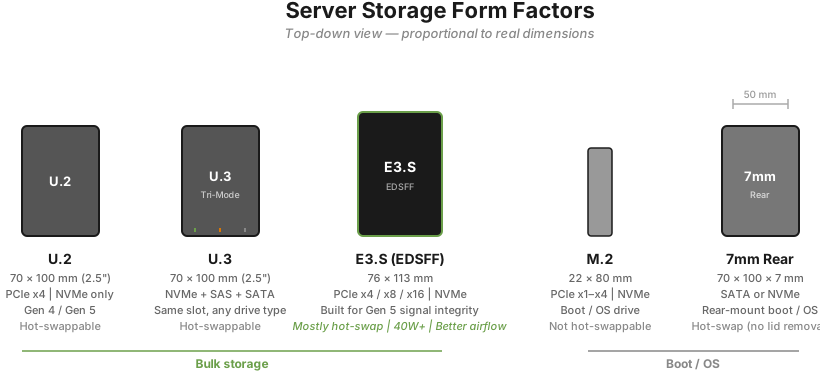 Figure 4: Server storage form factors, proportional to real dimensions. Based on SNIA (2024).
When the Rules Break: Real-World Design Trade-offs
These conventions — E3.S up front, M.2 inside — hold for standard 1U and 2U rack servers. But when density or cooling demands push the design to its limits, engineers get creative.
Take the Lenovo ThinkSystem SC777 V4, a Neptune direct-water-cooled system built for the NVIDIA GB200 NVL4 architecture. The entire server tray is a densely packed, liquid-cooled compute block. There's no room for front-facing drive bays, so up to 10 E3.S NVMe drives are mounted internally (Lenovo Press, 2025). Hot-swappability is sacrificed for raw compute density and thermal efficiency.
Or consider the SR680a V4, Lenovo's 8U AI server. Here the problem is density: the front panel is entirely consumed by 8x hot-swap NVMe bays and 8x integrated OSFP ports (powered by integrated ConnectX-8 SuperNICs) for the HGX B300 GPUs (NVIDIA, 2026). Internal access is blocked by massive GPU baseboards and airflow baffles, and the previous generation's rear-serviced M.2 slots were difficult to maintain. The solution? Move the M.2 boot drives to front-facing, hot-swappable bays as well. It's a necessary pivot to keep the system serviceable without disassembling a multi-million-dollar AI node just to replace a failed OS drive.
These exceptions aren't quirks — they're what happens when the lane budget and the laws of thermodynamics collide with real workloads.
The Price Flip: How NVMe Gen 4 Got Cheaper Than SAS
There's a long-standing assumption in the industry that NVMe is the expensive option, SAS is the reliable middle ground, and SATA is the budget choice. The current market, however, tells a different story.
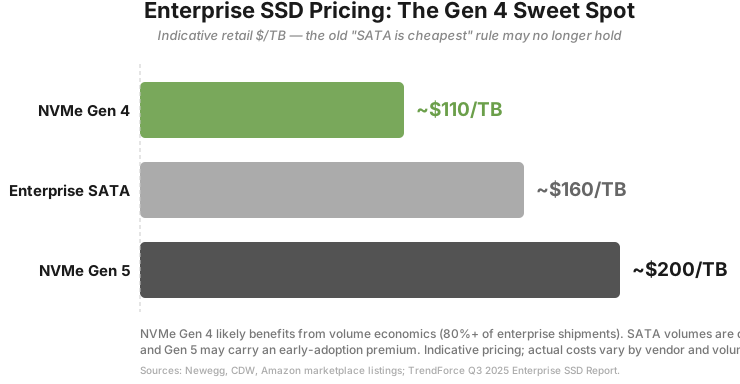 Figure 5: Indicative enterprise SSD pricing. Sources: TrendForce (2025), industry estimates.
At the drive level, Read-Intensive (Data Center class) NVMe Gen 4 SSDs have reached price parity with enterprise SATA SSDs (TrendForce, 2025). The underlying NAND chips cost the same to manufacture regardless of the interface. And on the metric that actually matters to a business — cost per IOPS or cost per GB/s of bandwidth — NVMe is drastically cheaper. Buying enterprise SATA today often means paying the same dollar amount for a fraction of the performance.
But the real story is at the system level. NVMe Gen 4 is actively displacing SAS because of the infrastructure it doesn't need:
No controller tax. SAS drives require a dedicated HBA or RAID controller — expensive silicon that can add hundreds or thousands of dollars to a build. Direct-attach NVMe wires straight to the CPU. No controller card required.
No expander tax. Plugging 24 SAS drives into a server means a backplane with an active SAS Expander chip. NVMe backplanes, especially for Gen 4, can be entirely passive — just copper traces routing PCIe lanes. Simpler board, lower cost.
Commoditization. With Gen 5 now the flagship standard for high-performance deployments, Gen 4 NVMe silicon has been commoditized at massive scale. Flash controller manufacturers are churning out Gen 4 chips so efficiently that bare Gen 4 NVMe drives now undercut specialized Enterprise SAS SSDs.
The bottom line: configuring a server with 8x SAS SSDs means buying the drives plus an expensive controller plus an active expander backplane. Configuring the same server with 8x Gen 4 NVMe SSDs means buying the drives plus a cheaper passive backplane. NVMe Gen 4 isn't just faster — it's fundamentally cheaper to implement at the system level.
Closing: What's Next
This was all about the storage side of the conversation — how the CPU talks to drives, and the engineering that makes that possible. But storage is only part of the lane budget. In Part 2, we'll look at what happens when GPUs, network cards, and OCP modules start competing for those same 128 doorways — and why that competition is at the heart of every modern AI infrastructure decision.
References
- Lenovo Press (2025). "ThinkSystem SR635 V3 Server Product Guide." lenovopress.lenovo.com/lp1609
- AMD (2023). "EPYC 9004 Series Processors Data Sheet." amd.com
- Intel (2025). "Xeon 6 Processor Family Product Brief." intel.com
- T10 Technical Committee (2017). "SAS-4 (Project T10/BSR INCITS 534)." t10.org
- TrendForce (2025). "Enterprise SSD Market Reports (2023–2025)." trendforce.com
- PCI-SIG (2019). "PCI Express Base Specification Revision 5.0 Version 1.0." pcisig.com
- SNIA (2024). "EDSFF (Enterprise and Data Center SSD Form Factor) Specification." snia.org
- NVIDIA (2026). "NVIDIA ConnectX-8 SuperNIC Product Brief." nvidia.com
- Lenovo Press (2025). "ThinkSystem SC777 V4 Server Product Guide." lenovopress.lenovo.com/lp2038
- Lenovo Press (2025). "ThinkSystem SR680a V4 Server Product Guide." lenovopress.lenovo.com/lp2037
- Computer Weekly (2024). "Flash drive prices grow quickly while SAS and SATA diverge." computerweekly.com
Disclaimer: AI was used to assist with grammar polishing and rhetoric refining. The opinions and conclusions are the author's own and do not represent those of any past or current employer. Feedback and corrections are always welcome.