I did not trust running OpenClaw on my personal machine. And I'm also not generous enough to spoil it with tokens 24/7. So I started feasibly on a VPS in the cloud. Twelve dollars a month, problem solved.
Then I needed to set up another one. And then another one. Following all these crazy tutorials on how to build an army of agents. And suddenly I was spending more time managing infrastructure than using the agents it was supposed to support.
What surprised me wasn't the infrastructure complexity — that part has known solutions. What surprised me was how little of it is actually about the machines. The hard questions turned out to be about identity, memory, and trust: what makes an agent yours, what it should remember when the hardware disappears, and how much you should trust a prompt to be a security boundary.
This article is the path I took from a single throwaway VM to something that might, with enough iteration, look like a platform. I don't know if it's the right answer. But the architecture decisions along the way turned out to be more interesting than I expected — and the real cost wasn't where I thought it would be.
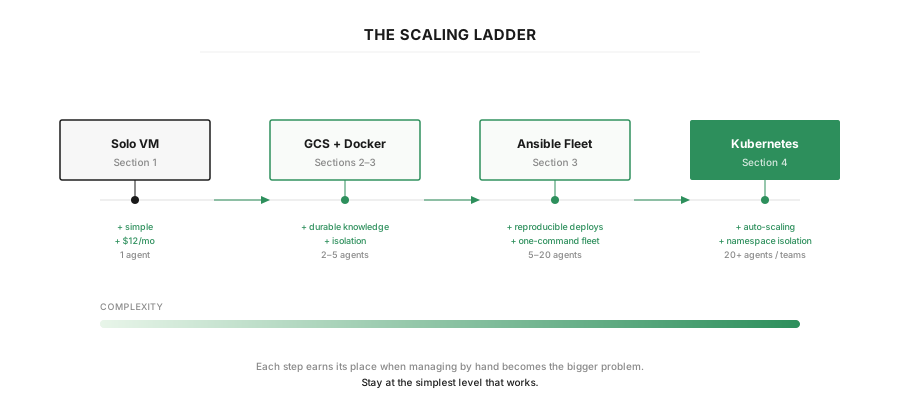 Figure 1: This summarizes the article — stop at whatever layer matches your need.
The Solo Agent
Before spinning up infrastructure, there are two things worth getting right upfront: how to isolate the agent, and how to size the machine. Both are easy to get wrong, and harder to fix once the VM is running.
Isolation. OpenClaw can sandbox its own tools — restricting file access to a safe subdirectory so the LLM can't accidentally trash your system. That's fine on your laptop. But we're putting this on a dedicated VM anyway, which already gives us what we need: a separate filesystem, its own network stack, and a hard resource ceiling. For a single agent, the VM is the sandbox. No need to add Docker on top — that complexity earns its place later when we start putting multiple agents on the same machine.
Sizing. OpenClaw is just a Node.js harness. It doesn't run the model — it sends API calls and orchestrates tool execution. Idle, it uses almost nothing. The spikes come from function calls (web scraping, document processing, shell commands), but they're short-lived. A 2 vCPU / 2 GB VM (~$12/month on GCP) handles this comfortably. If you're running a local model alongside it via something like Ollama, you'll want more — but that's a different architecture.
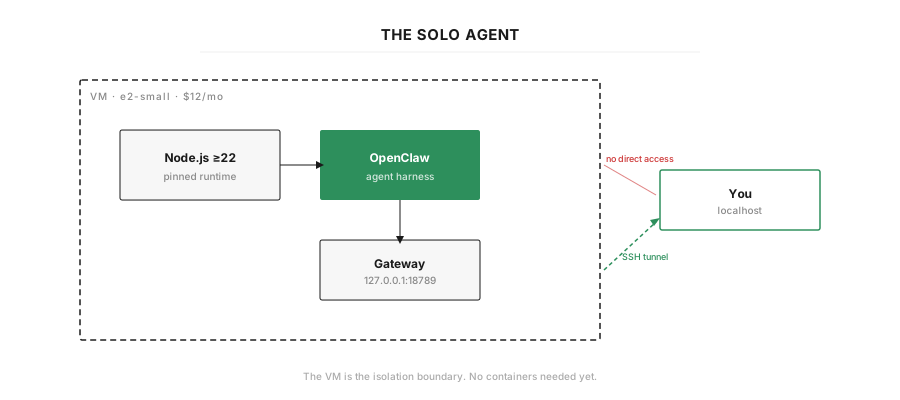 Figure 2: The solo agent — a single VM with a locked-down firewall and systemd service.
Pinning your runtime
OpenClaw needs Node.js 22 or higher. Ubuntu 22.04 ships version 12 by default — a ten major version gap. For one VM it's a quick fix in the startup script: add the NodeSource repository and install Node 22 from there.
But there's a bigger issue lurking behind the version number. OpenClaw is pre-1.0 and moves fast — five releases in February 2026 alone, with breaking changes in several of them (default SSRF policies, memory auto-capture behaviour, config schema migrations). The project's own docs say to "treat updates like shipping infra." That's honest advice, and it means you probably want to pin a specific version (npm install -g [email protected]) and only upgrade deliberately, after checking the changelog.
This is also where containers start to make sense — not for isolation (the VM handles that), but for freezing a known-good environment. A Docker image with a pinned Node version and a pinned OpenClaw version gives you a reproducible baseline that doesn't drift when Ubuntu pushes a kernel update or someone runs apt upgrade. For one agent, it's optional. Once you're deploying for other people, it becomes essential. We'll get there in section 3.
Before you expose anything
This part is not optional. OpenClaw has had real security incidents — a critical RCE vulnerability (CVE-2026-25253, CVSS 8.8) exploitable through a single malicious link, and over 30,000 exposed instances discovered on the public internet by Bitsight. The project is young and the attack surface is large: shell access, browser control, messaging integrations, all running in a loop without asking.
A few non-negotiable practices:
- Keep the gateway on loopback. OpenClaw binds to
127.0.0.1:18789by default — leave it there. Access it through an SSH tunnel or Tailscale, never by opening the port to the internet. - Lock down the config directory. Your API keys, OAuth tokens, and channel credentials live under
~/.openclaw. Permissions should be700on the directory and600onopenclaw.json. Runopenclaw security audit --deepto catch anything you missed. - Pin your version. As discussed above —
@latestis fine for experimenting, but in production you want a specific version so updates don't surprise you. - Run
openclaw doctorregularly. It audits config drift, service health, and security policies in one pass.
If you want a smaller attack surface altogether, NanoClaw is a stripped-down fork at roughly 500 lines of TypeScript — small enough to read and audit in under ten minutes.
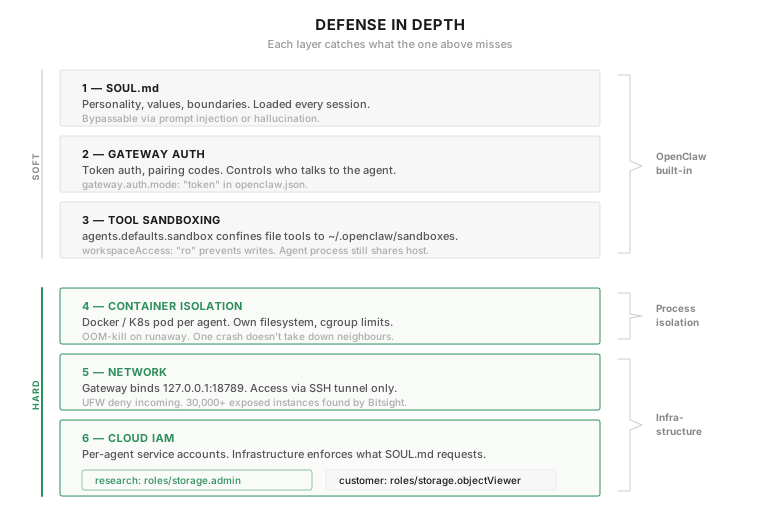 Figure 3: Defense in depth — soft boundaries (prompt, auth, sandboxing) guide the agent; hard boundaries (containers, network, IAM) enforce it.
With those decisions made, the actual setup is straightforward. A single Terraform file provisions an Ubuntu VM on GCP with a locked-down firewall. A startup script installs Node.js 22 via NodeSource, installs OpenClaw via npm, and registers the gateway as a system-level systemd service. (A note on that: OpenClaw's built-in gateway install command creates a user-level service, which has known issues on headless VMs — the D-Bus session bus isn't available. A system service avoids this entirely.)
From terraform apply to a running agent: about three minutes. The entire agent is described in two files, and you can tear it down and rebuild it in minutes.
Which sounds great, until you realize that tearing it down also destroys everything the agent knows.
Give It a Knowledge Base
The solo agent runs. It responds, it survives reboots. But it has amnesia. Destroy the VM — or even just redeploy after a config change — and everything the agent knows vanishes: conversation history, learned context, daily memory logs, custom skills. Gone.
This isn't just a disaster recovery problem. It's a design problem. The agent's knowledge is trapped on one VM's filesystem. You can't move it, can't share it with a second agent, can't rebuild from scratch without losing weeks of accumulated context. And OpenClaw's memory model makes this worse than you'd expect — unlike a stateless chatbot, an OpenClaw agent compounds over time. Its daily logs build into curated long-term memory. Its USER.md learns who you are. Its SOUL.md gets refined through iteration. Losing that isn't like losing a config file.
To understand what needs to survive, you need to see what an OpenClaw agent actually looks like on disk.
Anatomy of an OpenClaw agent
Everything lives under ~/.openclaw/:
~/.openclaw/
├── openclaw.json              ← main config: gateway, channels, models, security
├── credentials/               ← API keys, OAuth tokens (chmod 600)
│   ├── anthropic
│   └── openrouter
├── agents/                    ← per-agent runtime state
│   └── <agentId>/sessions/    ← conversation transcripts (.jsonl + .bak files)
└── workspace/                 ← the agent's brain
    ├── AGENTS.md              ← operating instructions, loaded every session
    ├── SOUL.md                ← personality, values, boundaries
    ├── USER.md                ← who the user is, preferences
    ├── IDENTITY.md            ← name, role, goals, voice
    ├── TOOLS.md               ← tool guidance and conventions
    ├── HEARTBEAT.md           ← periodic check cadence
    ├── BOOTSTRAP.md           ← first-run ritual (delete after setup)
    ├── MEMORY.md              ← curated long-term memory (optional)
    ├── memory/                ← daily logs
    │   ├── 2026-02-26.md
    │   └── 2026-02-27.md
    └── skills/                ← workspace-level skill overrides
openclaw.json is the backbone — it controls which port the gateway listens on, which LLM to use, which channels are enabled, and security settings. It uses a defaults-with-overrides pattern: baseline config in agents.defaults, per-agent overrides in agents.list[].
The workspace is the agent's brain. AGENTS.md is the primary instruction file — operating rules, priorities, and behavioural contracts — loaded at the start of every session. SOUL.md is personality and values. USER.md is who you are. MEMORY.md is curated long-term memory that the agent maintains over time. The memory/ directory holds daily logs — raw notes from each day that get distilled into MEMORY.md as the agent identifies what's worth remembering permanently.
This matters because the file layout tells you directly what's portable, what's sensitive, and what's disposable.
Disposable compute, durable knowledge
The fix is a separation that turns out to be the most important architectural decision in this whole setup: make the compute disposable and the knowledge durable.
The VM becomes a thing you can destroy and recreate without thinking twice. The agent's brain lives somewhere else — pulled in on boot, pushed back on shutdown. If a VM dies at 3 AM, the next one spins up and picks up where the last one left off.
For this setup, that "somewhere else" is Google Cloud Storage — a bucket of files in the cloud. But the principle is provider-agnostic. S3, Azure Blob Storage, even a git repo with automated push/pull — anything that outlives the VM works. What matters is the pattern, not the provider.
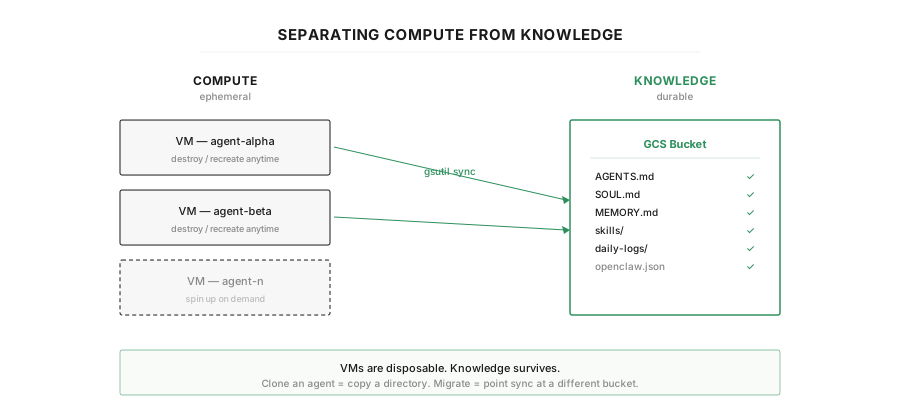 Figure 4: Disposable compute, durable knowledge — the VM is replaceable, the brain is not.
What syncs and what doesn't
Looking at the file layout, three categories emerge — and they don't sync for different reasons.
Sync: the workspace (the brain)
~/.openclaw/workspace/ is the entire agent identity and accumulated knowledge. AGENTS.md, SOUL.md, USER.md, daily memory logs, long-term memory, skills. This is everything that makes the agent yours, and it's what you absolutely cannot lose. Also sync openclaw.json — losing your gateway and model configuration is annoying enough to warrant a copy.
Don't sync: credentials (different security boundary)
~/.openclaw/credentials/ contains API keys, OAuth tokens, and channel secrets. The reason to keep these out of the bucket isn't that they're "machine-specific" — it's that they have a different security boundary and a different lifecycle. You rotate an API key without changing the agent's personality. You grant a second agent different channel access without touching its workspace. And credentials sitting in a storage bucket are a lateral movement risk — if the bucket is compromised, every API key is exposed. These belong in environment variables, a secrets manager, or at minimum Ansible Vault — not alongside the workspace files.
Don't sync: session transcripts (too large, already distilled)
~/.openclaw/agents/<id>/sessions/ contains the raw conversation history — full transcripts with tool calls, model responses, and metadata, stored as JSONL files. The practical problem is size and churn: these files grow fast, and OpenClaw generates .bak files alongside them during writes. Running gsutil rsync every 15 minutes against constantly-changing, large JSONL files plus their backups means a lot of bandwidth for data you mostly don't need. The architectural reason is that OpenClaw already distils the useful parts into daily memory logs under workspace/memory/. The curated summary is in the workspace; the raw transcript is disposable. If you lose session history, the agent loses the current conversation thread but retains everything it learned — which is the part that actually compounds.
The principle: sync what makes the agent smarter. Don't sync secrets. Don't sync what's already been distilled.
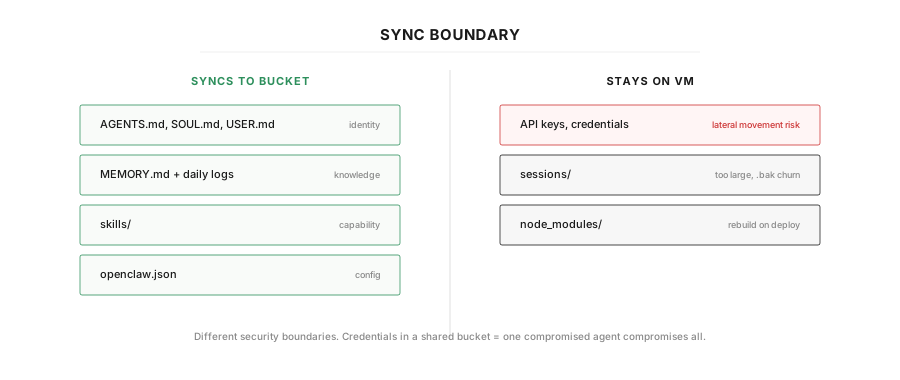 Figure 5: The sync boundary — workspace syncs, credentials and sessions don't.
The sync pattern
The mechanism is simple. On boot, the VM pulls the workspace from GCS. While running, a cron job pushes changes back every 15 minutes. On shutdown, a systemd hook does one final sync. Belt and suspenders.
The Terraform additions are minimal — a versioned bucket and a service account:
resource "google_storage_bucket" "knowledge" {
  name     = "${var.project_id}-openclaw-knowledge"
  location = "US"

  versioning { enabled = true }       # recover if the agent overwrites something
  force_destroy = false               # don't accidentally delete the brain
}

resource "google_service_account" "agent" {
  account_id   = "openclaw-agent"
  display_name = "OpenClaw Agent"
}

resource "google_storage_bucket_iam_member" "agent_storage" {
  bucket = google_storage_bucket.knowledge.name
  role   = "roles/storage.admin"
  member = "serviceAccount:${google_service_account.agent.email}"
}
A service account is a non-human identity — instead of putting GCS credentials in a config file on the VM, GCP authenticates the VM through its own identity. The VM can access the bucket; nothing else can. If someone compromises the VM, they get access to one bucket, not your entire cloud account. Attach it to the VM with a service_account block and you never manage a key file.
The sync itself is three lines of gsutil:
# Pull on boot
gsutil -m rsync -r "gs://$BUCKET/workspace/" ~/.openclaw/workspace/
gsutil cp "gs://$BUCKET/config/openclaw.json" ~/.openclaw/openclaw.json

# Push back (cron every 15 min + shutdown hook)
gsutil -m rsync -r ~/.openclaw/workspace/ "gs://$BUCKET/workspace/"
gsutil cp ~/.openclaw/openclaw.json "gs://$BUCKET/config/openclaw.json"
The shutdown hook is a small systemd unit that runs the push before the machine goes down:
[Unit]
Description=Sync OpenClaw brain to GCS before shutdown
DefaultDependencies=no
Before=shutdown.target reboot.target halt.target

[Service]
Type=oneshot
ExecStart=/root/sync-to-gcs.sh

[Install]
WantedBy=halt.target reboot.target shutdown.target
One tradeoff to acknowledge: gsutil rsync is not real-time. There's a window of up to 15 minutes where the VM has data that the bucket doesn't. For most agent workloads this is fine — daily memory logs and SOUL.md edits don't happen every minute. If you're running something where losing 15 minutes of memory would be catastrophic, you could tighten the cron interval or switch to a FUSE-mounted bucket (gcsfuse), but that adds latency to every file operation and slows down the agent.
What this quietly unlocks
The immediate benefit is obvious: you can tear down and rebuild the VM without losing anything. But the separation has a second-order effect that matters more.
The agent's brain is no longer locked to one machine. It's a directory in a bucket. That means:
- A second agent can read from the same bucket. Shared knowledge across agents becomes a storage permission, not a synchronization problem.
- Cloning an agent is copying a directory. Duplicate the workspace, change the SOUL.md, deploy to a new VM. The new agent starts with all the knowledge of the original.
- Migration is trivial. Moving from GCP to AWS, or from cloud to on-prem, means pointing the sync at a different bucket. The agent doesn't care where its brain lives.
This is the design decision that makes everything in sections 3 and 4 possible. Without it, every agent is a snowflake tied to its VM. With it, agents become portable, shareable, and disposable in the best sense — the kind of disposable where nothing of value is lost.
And most importantly, your agent can finally take a break when you don't need it — without forgetting everything by morning. Which is great, until someone asks for a second one.
The Clone Wars
Once the brain lives outside the VM, a second agent stops being a new infrastructure project. It's a new SOUL.md and a few changed variables. But doing it by hand — copying configs, editing files on two machines — means every difference between agents exists as undocumented manual edits. The template is in your head, not in code. That's what this section fixes.
But first, it helps to ask: what actually changes between two agents? Less than you'd think.
Shared vs. per-agent
Look at the file layout from section 2. Most of it is identical across agents — the runtime, the installed skills, the knowledge base sitting in GCS. The things that differ are small and well-defined:
- SOUL.md — different personality, different boundaries. A research agent that's thorough and cites sources is not the same as a customer support agent that's concise and never leaks internal details.
- openclaw.json — different channels (one on Telegram, one on Discord), maybe a different model, different heartbeat cadence.
- Credentials — different API keys, different channel tokens.
- Permissions — a research agent with read/write access to the full knowledge base is not the same as a customer-facing agent that should only read from a curated subset.
Everything else is shared. That's the insight: cloning an agent isn't duplicating infrastructure. It's writing a new SOUL.md and changing a few variables.
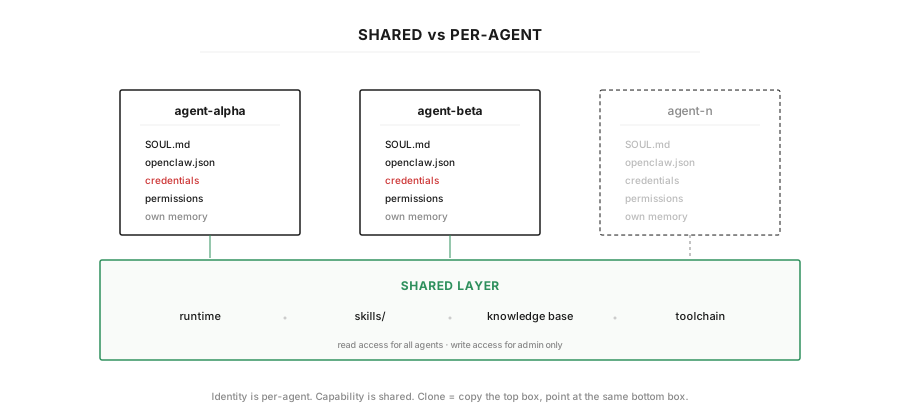 Figure 6: Cloning an agent — copy the shared layer, write new per-agent config.
Here's what the two souls looked like:
# SOUL.md — research-agent

You are an internal research assistant for a technical team.
- Summarise documents, extract key findings, answer questions against the knowledge base.
- Be thorough. Cite sources. Flag uncertainty.
- You have access to the full knowledge base (read/write).
- Never share internal documents externally.
# SOUL.md — customer-agent
You are a customer support agent.
- Answer product questions, look up tickets, escalate when unsure.
- Be concise and friendly. Keep responses under 3 sentences unless asked for detail.
- You have access to the curated FAQ and product docs (read-only).
- Never expose internal pricing, roadmap, or engineering details.Same runtime, same skills, different soul. But notice the customer agent's SOUL.md says "read-only" — that's a prompt-level instruction. If the LLM hallucinates a write command, nothing stops it. We need the infrastructure to enforce it too.
Prompt-level vs. infrastructure-level enforcement
This is worth pausing on because it's a mistake people make with agent deployments: trusting the prompt to be the security boundary.
A SOUL.md that says "read-only access" is guidance to the model. It works most of the time. But models hallucinate, ignore instructions, and get manipulated through prompt injection — especially in a system like OpenClaw where the agent processes untrusted input from messaging channels. If your customer-facing agent has write access to the knowledge base at the infrastructure level, a sufficiently creative input could trick it into modifying shared documents, regardless of what SOUL.md says.
The fix is defense in depth: the prompt says read-only, and the service account enforces it. Two separate service accounts, two different IAM bindings — the research agent gets roles/storage.admin, the customer agent gets roles/storage.objectViewer. If the customer agent tries to write, GCS rejects the request before it reaches the bucket. The model's opinion doesn't matter.
# Research agent: full access
resource "google_service_account" "research_agent" {
  account_id   = "openclaw-research"
  display_name = "OpenClaw Research Agent"
}

resource "google_storage_bucket_iam_member" "research_full" {
  bucket = google_storage_bucket.knowledge.name
  role   = "roles/storage.admin"
  member = "serviceAccount:${google_service_account.research_agent.email}"
}

# Customer agent: read-only
resource "google_service_account" "customer_agent" {
  account_id   = "openclaw-customer"
  display_name = "OpenClaw Customer Agent"
}

resource "google_storage_bucket_iam_member" "customer_readonly" {
  bucket = google_storage_bucket.knowledge.name
  role   = "roles/storage.objectViewer"
  member = "serviceAccount:${google_service_account.customer_agent.email}"
}
This pattern scales to any permission boundary: which channels an agent can access, which APIs it can call, which parts of the knowledge base it can see. The prompt defines intent. The infrastructure enforces it.
Docker earns its place
In section 1, we said Docker was unnecessary for a single agent on a dedicated VM. With two agents, that changes for two reasons.
Process isolation. Two agents on the same VM share the same process space. If the research agent goes into a recursive loop and eats all available memory, the customer agent goes down with it. Docker gives each agent its own container with hard resource limits — CPU ceiling, memory ceiling, automatic restart on crash. One agent's bad day doesn't become everyone's outage.
Reproducibility. Remember the runtime pinning discussion from section 1 — OpenClaw is pre-1.0, breaking changes land weekly, and Ubuntu's default Node.js is a decade behind what OpenClaw needs. When you're deploying for yourself, you can manage this by hand. When you're deploying for a friend — or eventually a team — "SSH in and fix the Node version" doesn't scale. A Docker image with a pinned Node version and a pinned OpenClaw version is a reproducible unit you can hand to someone and say "this works."
The Compose file per agent is minimal:
services:
  openclaw:
    image: ghcr.io/openclaw/openclaw:2.4.1
    container_name: ${AGENT_NAME}
    restart: unless-stopped
    ports:
      - "${GATEWAY_PORT}:18789"
    volumes:
      - ${OPENCLAW_HOME}:/root/.openclaw
    environment:
      - OPENCLAW_HOME=/root/.openclaw
    env_file:
      - ${ENV_FILE}
    deploy:
      resources:
        limits:
          cpus: "${CPU_LIMIT}"
          memory: ${MEM_LIMIT}
Each agent gets its own .openclaw directory, its own .env, its own port. The image is the same. The difference is configuration.
Making the difference a variable
At this point, the pattern is clear: every agent is the same template with a handful of variables swapped out. That's exactly what Ansible is for — it SSHes into machines and applies configuration, using an inventory file that defines what's different about each host.
Terraform provisions the VMs and IAM. Ansible configures what's on them. The inventory reads like a table of agents:
all:
  children:
    agents:
      hosts:
        research-agent:
          ansible_host: 34.xx.xx.01
          agent_name: research-agent
          soul_file: souls/research.md
          config_file: configs/research.json
          gateway_port: 18789
          cpu_limit: "2.0"
          mem_limit: "4G"
          service_account: openclaw-research
          anthropic_api_key: "{{ vault_research_api_key }}"
          channels:
            telegram: "{{ vault_research_telegram_token }}"

        customer-agent:
          ansible_host: 34.xx.xx.02
          agent_name: customer-agent
          soul_file: souls/customer.md
          config_file: configs/customer.json
          gateway_port: 18790
          cpu_limit: "1.0"
          mem_limit: "2G"
          service_account: openclaw-customer
          anthropic_api_key: "{{ vault_customer_api_key }}"
          channels:
            discord: "{{ vault_customer_discord_token }}"
The playbook deploys both agents the same way — create the directories, template the config, copy the SOUL.md, pull the knowledge from GCS, start the container. Credentials stay in Ansible Vault (encrypted at rest, decrypted only during deployment). Adding a third agent — sales, engineering, HR — is a new entry in the inventory, a new SOUL.md, and a service account with the right permissions. One command: ansible-playbook playbook.yml. No SSH, no snowflakes.
Notice the resource limits in the inventory: the research agent gets more CPU and memory because it runs heavier function calls (document processing, web search). The customer agent is lighter. This kind of right-sizing is hard when you're managing everything by hand but becomes natural when the difference between agents is a YAML file.
What we have now
Two agents, deployed from a single playbook, sharing a knowledge base but isolated in their own containers with their own permissions. Adding a third takes a YAML entry and a markdown file. The infrastructure enforces what the prompt intends. No one SSHed into anything.
This works well at small scale — a handful of agents for yourself and people you know. But it assumes you're the one managing every agent, writing every SOUL.md, and running every deployment. What happens when someone asks "can you set up an agent for my department too?" — and you realise you're no longer managing your own tools, but running a platform?
Release the Fleet
Up to this point, everything has been about my agents. My VMs, my configs, my knowledge base. That works for a small team, but the moment someone asks "can you set up an agent for my department too?" the model breaks. You're not managing your own tooling anymore — you're running a platform.
The idea of treating this as a platform came to me through work, not through AI. At my day job in high-performance computing, I was fortunate to work alongside some seriously sharp infrastructure engineers — the kind of people who think in clusters, not in machines. Watching them orchestrate hundreds of nodes across racks for simulation workloads, Kubernetes stopped being an abstract concept and became something I could see the shape of. And at some point the analogy clicked: if you can schedule compute jobs across a fleet of machines, you can schedule agents the same way. What we're building here isn't that different from what HPC teams have been doing for decades — allocating resources to workloads, isolating tenants, scaling up and down with demand. The workload just happens to be an LLM harness instead of a physics simulation.
That reframing also opens up a question that matters more than it seems at this stage: can this run entirely on your own infrastructure? Not every organisation wants its agents calling external APIs over the public internet. Some can't — regulatory requirements, data sovereignty, or simply the preference not to send internal documents through someone else's model. If the agent harness is lightweight (OpenClaw, Node.js, barely any compute), and the model runs locally (Ollama, vLLM, or a dedicated GPU node), then the entire stack — orchestration, knowledge, inference — can live inside your own network. No tokens leaving the building. That's the fully-local AI factory: your agents, your models, your data, your cloud.
Kubernetes is how you get there. But I want to be clear — if you're running five agents or fewer, you probably don't need any of this. Go back to section 3 and be happy. K8s is overhead, and it's only worth it when the alternative (managing everything by hand) becomes the bigger problem.
From VMs to pods
The jump from section 3 to here is smaller than it looks. Ansible with Docker Compose gave us templated deployments — one inventory file, one playbook, N agents. Kubernetes does the same thing but adds what Ansible can't: auto-restart when a container crashes at 3 AM, resource limits that actually kill a runaway process instead of letting it starve its neighbours, rolling updates that don't take everything offline at once, and real tenant isolation so the marketing team's agent can't read engineering's pod logs.
The architecture maps cleanly. Terraform provisions a GKE cluster instead of individual VMs. Helm — basically a package manager for Kubernetes, like apt or brew but for cluster deployments — replaces Ansible for templating each agent. Each team or department gets their own namespace, which is Kubernetes' way of drawing a fence around what they can see and touch. All agents still share the GCS knowledge layer from section 2, but namespace-level RBAC (who's allowed to do what) and per-agent service accounts control who can read what.
The cluster itself is modest:
resource "google_container_cluster" "agents" {
  name     = "openclaw-platform"
  location = var.region

  workload_identity_config {
    workload_pool = "${var.project_id}.svc.id.goog"
  }
}

resource "google_container_node_pool" "agents" {
  name    = "agent-pool"
  cluster = google_container_cluster.agents.name

  autoscaling {
    min_node_count = 1
    max_node_count = 10
  }

  node_config {
    machine_type = "e2-medium"  # 2 vCPU / 4 GB — fits ~4 agents per node
    disk_size_gb = 30
  }
}
Autoscaling matters here. During working hours, you might have a dozen agents actively processing function calls and burning through RAM. At midnight, most are idle. The node pool scales down and you stop paying for capacity nobody's using — which ties back to the sizing argument from section 1. You're not paying for a fleet of machines, you're paying for the actual load.
One chart, many agents
Each agent gets deployed as a Helm release using the same chart. The differences live in a values file — the same pattern as the Ansible inventory in section 3, just in Kubernetes' language:
# values/research.yaml
agentName: research-agent
knowledgeBucket: "my-project-openclaw-knowledge"
serviceAccountName: openclaw-research

soul: |
  You are an internal research assistant for a technical team.
  - Summarise documents, extract key findings, answer questions.
  - Be thorough. Cite sources. Flag uncertainty.
  - Full knowledge base access (read/write).
  - Never share internal documents externally.

resources:
  requests: { cpu: "500m", memory: "1Gi" }
  limits:   { cpu: "2000m", memory: "4Gi" }
# values/customer.yaml
agentName: customer-agent
knowledgeBucket: "my-project-openclaw-knowledge"
serviceAccountName: openclaw-customer
soul: |
You are a customer support agent.
- Answer product questions, look up tickets, escalate when unsure.
- Concise and friendly. Under 3 sentences unless asked.
- Read-only access to FAQ and product docs.
- Never expose internal pricing, roadmap, or engineering details.
resources:
requests: { cpu: "250m", memory: "512Mi" }
limits: { cpu: "1000m", memory: "2Gi" }Deploy both:
kubectl create namespace research
kubectl create namespace customer-support

helm install research-agent ./charts/openclaw-agent \
  -n research -f values/research.yaml

helm install customer-agent ./charts/openclaw-agent \
  -n customer-support -f values/customer.yaml
Adding a third agent is a new values file and a helm install. The chart handles everything else.
Namespace isolation
Each namespace is a boundary — the research agent can't see or touch anything in customer-support, and vice versa. But namespace isolation only means something if you enforce it at the network and permission level too:
Network policies prevent agents from talking to each other. By default, pods in Kubernetes can reach any other pod in the cluster. A simple policy flips this to deny-all for inbound traffic across namespaces:
apiVersion: networking.k8s.io/v1
kind: NetworkPolicy
metadata:
  name: deny-inter-namespace
spec:
  podSelector: {}
  policyTypes: [Ingress]
  ingress: []  # deny all ingress from other namespaces
RBAC limits what each service account can see within its namespace. A namespace-scoped role that only allows reading pod status and logs means a team can monitor their own agents but can't touch anyone else's:
apiVersion: rbac.authorization.k8s.io/v1
kind: Role
metadata:
  namespace: research
  name: agent-role
rules:
  - apiGroups: [""]
    resources: ["pods", "pods/log"]
    verbs: ["get", "list"]
The pattern from section 3 carries forward: agents share the knowledge layer (GCS) but can't see each other's runtime. Marketing can't poke around in engineering's pod logs. Each team sees their own agents and nothing else. The prompt says "read-only." IAM enforces it. Network policies prevent lateral movement. Defense in depth, at every layer.
Rolling updates without downtime
When you want to update OpenClaw across all agents, you don't do it all at once. Helm handles rolling updates — update the image tag and roll it out one agent at a time:
# Canary: update one agent first
helm upgrade research-agent ./charts/openclaw-agent \
  -n research -f values/research.yaml \
  --set image.tag="2.5.0"

# Verify it's healthy
kubectl -n research rollout status deployment/research-agent

# Then roll out to everyone else
helm upgrade customer-agent ./charts/openclaw-agent \
  -n customer-support -f values/customer.yaml \
  --set image.tag="2.5.0"
If something breaks, helm rollback research-agent takes you back in seconds. Compare that to SSH-ing into machines and running docker compose pull by hand. And given how fast OpenClaw ships breaking changes — as we discussed in section 1 — the ability to canary an update on one agent before rolling it to everyone is not a nice-to-have. It's how you avoid waking up to a fleet of broken agents.
The fully-local option
Everything in this article has assumed a cloud LLM provider — Anthropic, OpenAI, or similar. But there's nothing in this architecture that requires it. The agent harness (OpenClaw) is lightweight and runs on small nodes. The knowledge layer (GCS) could be replaced with MinIO or any S3-compatible store running on-prem. And the model itself can run on a GPU node in the same cluster — Ollama, vLLM, or a dedicated inference server.
At that point, you have a fully air-gapped AI platform. No API keys leaving your network. No documents sent to external providers. No per-token billing. Just your agents, your models, your knowledge, your hardware. The trade-off is capability — local models are getting better fast but still lag behind frontier APIs for complex reasoning — and the operational burden of managing GPU infrastructure. But for organisations where data sovereignty is non-negotiable, this is the path.
I don't know if it's production-ready today. I built this on nights and weekends with a handful of use cases as validation. But the architecture works, the Terraform files apply, and the separation of concerns — disposable compute, durable knowledge, templated identity — holds whether you're running one agent or a hundred, in the cloud or on your own metal.
Closing: The Real Cost
I've been avoiding this part. Four sections of infrastructure, and I haven't once addressed what actually shows up on the bill.
A confession: if the bet on lightweight agent harnesses is right — and I think it is — then infrastructure follows the same commoditisation trajectory we've seen in compute for decades. It starts in the cloud because that's where the iteration speed is. Then it moves on-prem as the patterns stabilise. And the infrastructure cost converges toward boring. A two-node GKE cluster running a dozen agents is maybe $80–100 a month. That's not the number that keeps anyone up at night.
The LLM API bill is. Ten to twenty times the infrastructure cost, depending on how chatty your agents are and how trigger-happy they get with function calls. Every decision-maker eventually asks the same question: "which team is burning through our AI budget?" With one-VM-per-agent and Ansible, answering that means scraping logs from a dozen machines. With namespaced pods and centralised logging, it's a dashboard query. The platform doesn't reduce your token spend. But it makes the spend visible — per team, per agent, per namespace. You can't optimise what you can't measure, and the infrastructure gives you the measurement for free.
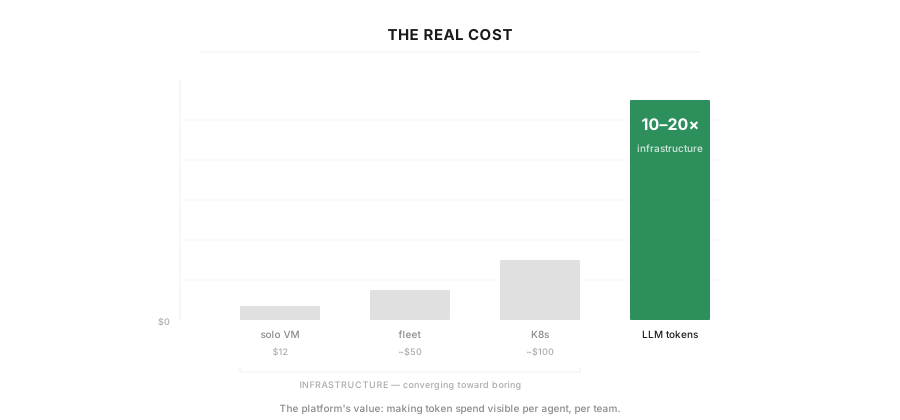 Figure 7: The real cost — infrastructure is boring, tokens are not.
But that's a problem for another time.
Disclaimer: AI assisted with the writing, the code, and the grammar. Then again, I need AI to sanitize my API keys anyway — might as well let it help with the prose too. All opinions and architecture decisions are my own.
References
- Terraform — Infrastructure as code for provisioning cloud resources declaratively.
- Ansible — Agentless automation for configuration management via YAML playbooks.
- Google Kubernetes Engine (GKE) — Google Cloud's managed Kubernetes service.
- Google Cloud Storage (GCS) — Unified object storage with versioning and IAM-based access control.
- Helm — The package manager for Kubernetes.
- Docker / Docker Compose — Container platform and multi-container orchestration.
- OpenClaw — Open-source AI assistant framework with multi-channel support (Telegram, Slack, Discord).
- NanoClaw — Lightweight, security-focused alternative to OpenClaw (~500 lines of TypeScript).
- CVE-2026-25253 — Critical RCE vulnerability (CVSS 8.8) in OpenClaw via authentication token exfiltration.
- Bitsight — OpenClaw Security Risks — Research identifying 30,000+ exposed OpenClaw instances on the public internet (Jan–Feb 2026).
- Kubernetes RBAC — Role-based access control for cluster resources.
- Kubernetes Network Policies — Pod-level firewall rules for traffic isolation.
- GKE Workload Identity — Secure GCP API access from pods without managing keys.
- Grafana — Open-source analytics and monitoring dashboards.